Visual Studio Code 1.115 is a release that makes one thing hard to miss: the editor is no longer treating AI as a side panel feature. Microsoft is pushing toward an agent-native workflow where the assistant has its own companion app, better browser tooling, and a more usable path into background terminals.
That matters because the biggest friction in AI-assisted development is no longer raw model quality. It is coordination. Developers need a clean way to split work, review changes, keep context across repos, and move between human control and agent execution without feeling like they are fighting the interface. VS Code 1.115 is clearly designed around that problem.
A companion app for agent-native work
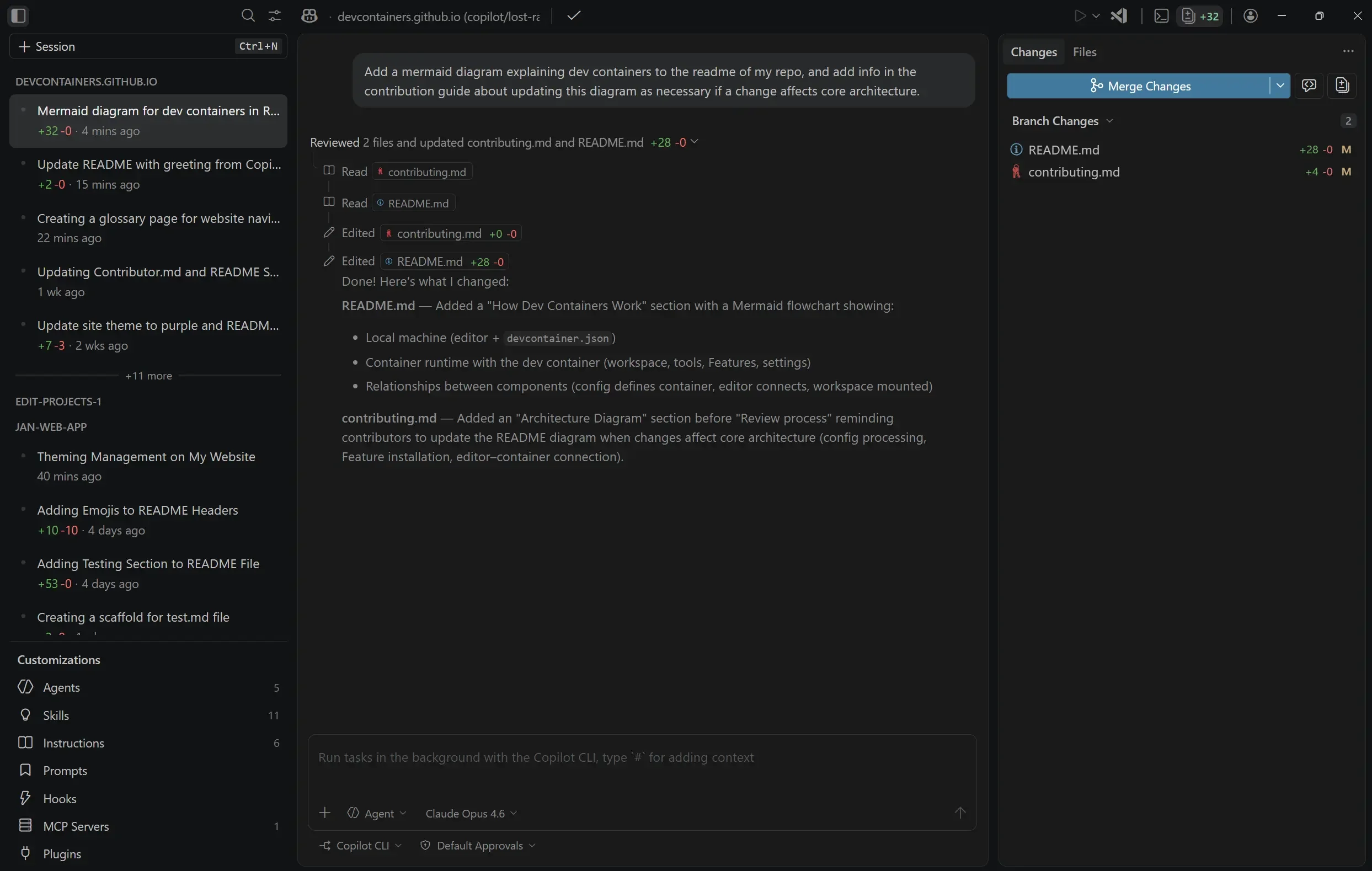
The headline addition is the new VS Code Agents preview app. It ships alongside VS Code Insiders and is built to let agents run in parallel across projects, each isolated in its own worktree. Instead of keeping every task inside one chat window, the app is designed for session management, review, and handoff.
That design choice is important. A lot of AI coding tools still feel like a prompt box attached to an editor. VS Code is moving in the opposite direction: the agent becomes a first-class participant in the development workflow, with its own space for sessions, diffs, feedback, and pull requests. For teams experimenting with multi-repo automation, that is a much more realistic operating model.
It also lowers the barrier to repeatable agent work. Custom instructions, prompt files, custom agents, MCP servers, hooks, plugins, and existing VS Code personalization all carry over into the new app. In practice, that means teams can reuse the same conventions they already depend on, instead of rebuilding a new operating ritual for every model or interface.
The browser and terminal are getting smarter too
VS Code 1.115 also tightens the loop around two places where coding agents usually lose time: the browser and the terminal. Browser tool calls now have clearer labels and direct links to the target tab, while long-running Playwright scripts can return deferred results for later polling. That may sound small, but it reduces the kind of ambiguity that makes agent runs hard to supervise.
The terminal side is even more consequential. Background terminals are no longer effectively dead ends when an agent needs to keep talking to a process after a timeout. With the new send-to-terminal capability, the agent can continue interacting with background shells, including cases like an SSH session waiting for a password prompt.
Microsoft also added experimental background notifications so the agent can be alerted when a command finishes or needs input. That pushes VS Code closer to an event-driven agent environment, where the model does not have to keep polling blindly just to know what happened.
Why enterprises should care
Another notable change is bring-your-own-key support for Copilot Business and Enterprise users. That is not just a billing detail. It gives organizations more control over how model access is configured while still using the Copilot workflow inside the editor.
For larger teams, that combination of agent workflows, browser integration, terminal control, and key management is a signal that agentic coding is moving out of the demo stage. The practical questions are becoming more operational: how do you route work between human and agent, how do you audit what happened, how do you prevent brittle one-off prompts from becoming institutional chaos, and how do you keep the toolchain portable?
VS Code 1.115 does not answer all of those questions, but it does show where the platform is heading. The future Microsoft is designing is not a chatbot attached to an IDE. It is an IDE plus an agent workspace, with shared context, better execution surfaces, and fewer seams between editing, testing, review, and handoff.
That is the real story in this release. It is less about any one feature and more about the shape of the workflow that those features imply. The next phase of AI-assisted development is not just faster autocomplete. It is a development environment that assumes agents will be executing, reviewing, and coordinating work continuously.