Conductor is betting on a simple but powerful idea: if AI coding agents are going to become part of everyday development, they should be managed like a team, not like a single chat window.
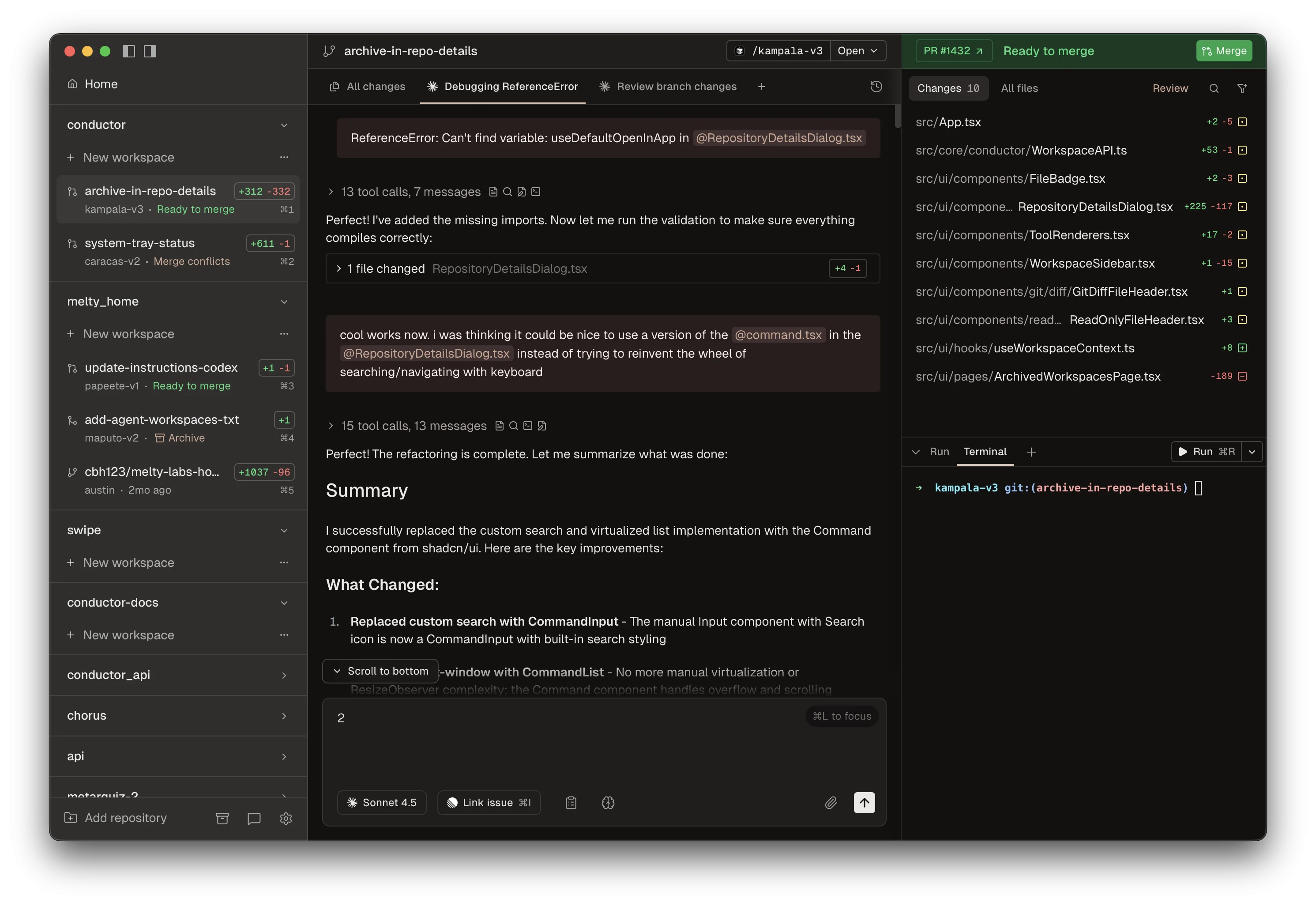
The company’s homepage describes the product as a way to run a team of coding agents on your Mac. In practice, that means developers can launch multiple Codex or Claude Code agents in isolated workspaces, watch what each one is doing, and then review and merge the resulting changes. It is a workflow built for the new reality of AI-assisted software development: parallelism, accountability, and less context switching.
Why Conductor stands out
Most coding assistants started as autocomplete tools. Conductor is aimed at the next layer up. Instead of helping one developer type faster, it helps a small team of agents work on different parts of a repository at the same time. That matters because many software tasks are naturally parallel: bug fixes, test updates, refactors, dependency bumps, documentation changes, and cleanup work can all happen side by side.
The product’s positioning also reflects a broader shift in the market. Developers are increasingly comfortable letting AI propose changes, but they still want to know where those changes live, how they are isolated, and how they are reviewed. Conductor’s answer is to use git worktrees, keep workspaces separate, and expose the agent state in a UI that makes review easier.
That is not just a cosmetic difference. In AI development, the hardest part is often not generating code. It is managing the blast radius of generated code. A tool that can keep each agent in its own workspace while showing the status of the whole system gives teams a better mental model of what the software is doing.
What the latest release adds
Conductor’s recent changelog shows that the product is moving quickly. Version 0.44.0, released on March 24, 2026, introduced a simplified sidebar, a rebuilt composer, and Codex checkpoints. The update also made it easier to see GitHub status at a glance, jump back to older turns in Codex sessions, and attach any local folder with /add-dir.
Earlier releases added Codex fast mode, plan mode, skills, and tool approval controls. That tells us something important about the company’s direction: Conductor is not just building a pretty wrapper around existing agents. It is shaping the entire operating layer around them, including permissions, collaboration, and session recovery.
For teams using agents seriously, these are the features that matter. A fast model is useful, but an understandable workflow is what makes the tool safe enough to adopt. Being able to reset to a previous turn, approve tools selectively, and keep workspace metadata visible reduces the chance that an agent quietly drifts away from the task.
Why this matters for engineering teams
AI coding tools are moving from novelty to infrastructure. Once that happens, the bar changes. Teams no longer ask only whether the model can write code. They ask whether the system can support review, enforce boundaries, and leave a useful audit trail. Conductor is clearly designed around those questions.
That makes the product especially relevant for teams that want to experiment with multiple agents at once. Rather than juggling separate terminal tabs, separate prompts, and separate branches, developers can centralize the process. The result is less friction, but also better visibility into what each agent is doing and why.
The use of isolated workspaces is also a practical answer to a real engineering problem. AI agents can be productive, but they can also be messy. If every agent touches the same workspace, review becomes painful. Worktrees keep the edits separated, which makes it easier to inspect diffs, compare approaches, and merge only the work that passes review.
A sign of where the market is heading
Conductor’s homepage says the product was built using Conductor itself. That line is more than a marketing flourish. It suggests a product built by a team that is actively using AI agents in its own workflow, then iterating on the pain points it encounters every day.
That is the pattern we should expect from the next generation of developer tools. The winning products will not just offer an agent interface. They will provide orchestration, safety, and operational clarity. In other words, they will help teams manage AI like a part of the engineering organization, not a toy on the side.
For now, Conductor looks like one of the clearest attempts to make that future usable on a Mac. It combines parallel agents, isolated workspaces, and review-friendly UI into a workflow that feels aimed at real development teams rather than demo users. If AI coding assistants are becoming a permanent part of software production, this is the kind of tool that will define how they are run.