Microsoft’s latest Visual Studio update is a useful sign of where AI-assisted development is heading next: away from one-off autocomplete and toward a more complete workflow that spans issue intake, remote execution, code edits, and verification. In this release, Visual Studio is no longer just a place to write code with AI help. It is becoming a control center for getting from a bug report to a validated fix with fewer context switches.
That shift matters because most real development work is not about generating the first draft of a function. It is about understanding messy requirements, reproducing failures, navigating unfamiliar code, and checking that a change actually behaves correctly under runtime conditions. Microsoft is trying to absorb more of that work into the IDE itself.
Cloud agents move from novelty to workflow
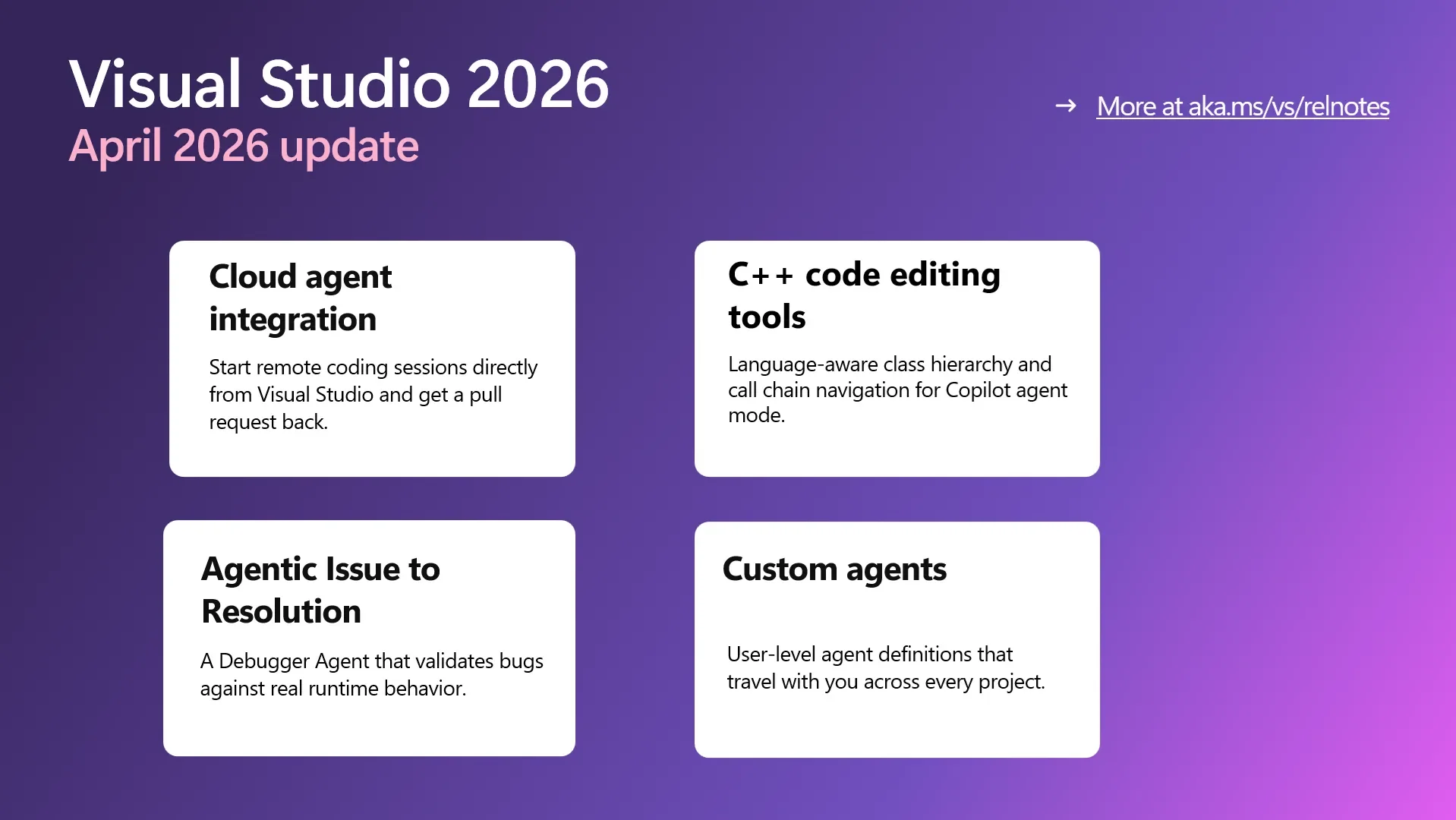
The biggest change in the April update is cloud agent integration. Developers can start remote coding sessions directly from Visual Studio, choose the cloud option from the agent picker, describe the task, and let the agent work on the repository from remote infrastructure. The appeal is obvious: the developer stays in the IDE, while the agent handles a chunk of the mechanical work in the background.
Microsoft says the cloud agent is powered by Copilot coding agent and can open an issue, prepare a pull request, and notify the developer when it is ready. That matters because it turns AI from a chat companion into something closer to a delegated teammate. Instead of asking an assistant for a snippet and then manually stitching together the rest, the developer can hand off a bounded task and continue working elsewhere.
There is also a practical nuance here. Remote execution gives the workflow more room to breathe. Long-running tasks no longer need to block the local machine, and developers do not have to keep the IDE open in a narrow “watch it think” loop. Visual Studio becomes the surface where the work is initiated and reviewed, not necessarily where every CPU cycle happens.
Custom agents are becoming portable
The update also extends custom agents beyond repository-scoped definitions. Microsoft is adding user-level agents that travel across projects, which is a small detail with a big implication. If teams end up standardizing on recurring behaviors, prompts, or tool connections, those agents can become part of a developer’s personal workflow rather than a one-off experiment tied to a single codebase.
That is an important step for AI-assisted development. The more work you do across multiple services, repos, and clients, the less useful it is to rebuild your AI setup every time you switch context. Portable agents create the possibility of reusable working styles: one agent for code understanding, another for debugging, another for repository hygiene, and so on. Microsoft is quietly moving toward a world where AI behavior is configurable at the developer level, not just at the project level.
Language-aware tools matter for large codebases
Another notable part of the release is the general availability of C++ code editing tools for agent mode. That may sound niche, but it matters because the hard part of AI coding is often not producing text; it is understanding structure. In large C++ codebases, class hierarchies, function relationships, and cross-file dependencies are exactly where generic language models tend to get shaky.
By giving Copilot language-aware navigation through symbol hierarchies and call chains, Visual Studio is making the assistant less like a loose chatbot and more like a tool with real codebase awareness. That is the direction high-value AI development tools need to take: better grounding, better structural understanding, and fewer hallucinated leaps between unrelated parts of the system.
Debugging becomes an AI-guided loop
The updated Debugger Agent is probably the clearest example of what Microsoft is chasing. Traditional debugging often starts with uncertainty: a vague bug report, missing reproduction steps, and a developer trying to infer what happened from a stack trace. The new workflow tries to make that process more guided and more repeatable. The agent can help interpret the issue, propose a hypothesis, instrument the app, run the session, inspect the runtime, and suggest a fix once the root cause becomes visible.
That is a big conceptual change. Debugging is one of the most expensive parts of software work because it interrupts deep focus and forces the developer to juggle code, state, logs, and expectations at once. If the agent can reduce that mental load, even partially, it could save a lot of time on the kinds of bugs that usually consume an entire afternoon.
Microsoft’s own framing is interesting here: the goal is not just to search for a bug faster, but to reduce uncertainty. That is exactly where AI tends to add the most value in software engineering. It is not only about generating new text. It is about narrowing the search space for humans.
The UX tweaks are less flashy, but still important
The update also includes smaller changes that show Microsoft is paying attention to how developers actually work. IntelliSense now gets priority over Copilot completions so the editor presents fewer competing suggestions at once. Keyboard shortcuts for accepting inline suggestions are also customizable. These are not headline-grabbing AI features, but they matter because AI tooling lives or dies by friction.
If a developer has to fight the editor, the assistant becomes a distraction. If the editor can stay out of the way, the AI features feel integrated rather than bolted on. That is why these interface decisions deserve attention: they help determine whether Copilot feels like a helpful layer or an overactive second opinion.
What this means for teams
Seen together, the update points to a broader industry trend. AI-assisted development is moving from suggestions to orchestration. The assistant is no longer just recommending code. It is taking on more of the surrounding work: starting sessions, creating issues, generating pull requests, validating fixes, and helping developers navigate large codebases.
That matters because the best AI coding tools are not necessarily the ones that write the most code. They are the ones that make the whole development loop less expensive. If an assistant can shave time off reproduction, analysis, implementation, and verification, then it starts to affect the economics of software delivery in a real way.
For Microsoft, the message is clear: Visual Studio is being positioned as an AI-native development environment where Copilot is not a side panel but a workflow layer. For developers, the practical question is simpler: does this reduce the time between “something is broken” and “the fix is verified”? If the answer is yes, the update is more than a feature release. It is a preview of how AI will sit inside the day-to-day mechanics of software engineering.